theory
actuation and feedback
Marcel Knauf
Hong Lâm Nguyen
Philip Poplutz
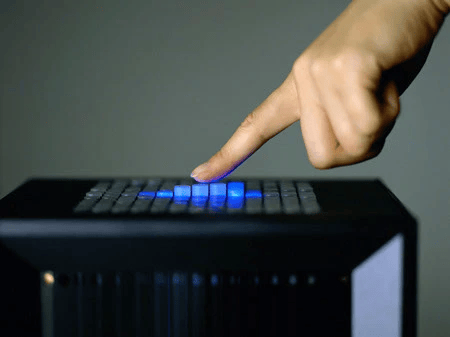
Figure 1: Lumen Shape Display (photograph by Makoto Fujii, courtesy AXIS magazine)
![Figure 2: Topobo – Kinectic Toy that records and replays movement (adapted from [Raffle et. al 2004])](Topobo.jpg)
Figure 2: Topobo – Kinectic Toy that records and replays movement (adapted from [Raffle et. al 2004])
![Figure 3: TangibleCircuits (adapted from [Davis et. al 2020])](TangibleCircuits.png)
Figure 3: TangibleCircuits (adapted from [Davis et. al 2020])
![Figure 4: Inflatable Mouse (adapted from [Kim et. al 2008])](Mouse.png)
Figure 4: Inflatable Mouse (adapted from [Kim et. al 2008])
Actuation and feedback create a bidirectional link between digital data and physical matter, enabling intuitive interactions.
04.05.2026
“Recently, a growing number of de-signers and researchers have been taking the next logical step: creating interfaces where physical, tangible elements are not merely dynamically coupled to the digital attributes and information, but are themselves dynamic, self-reconfigurable devices that can change their physical prop-erties depending on the state of the interfaces, the user, or the environment.” (Ivan Poupyrev)
Tangible User Interfaces (TUIs) represent a paradigm shift in human-computer interaction, moving from virtual-only screens to environments where the virtual and physical coexist. Unlike traditional graphical user interfaces (GUIs) that rely on a single pointer controlled by a mouse or keyboard, TUIs allow users to interact with digital information through the manipulation of physical objects (Krestanova et al. 2021). This approach aims to restore the richness of physical interaction, utilizing our natural skills for handling tools and spatial reasoning.
What is Actuation?
In the context of user interfaces, actuation is defined as the ability of a system to put physical components in motion in a way that is detectable by the user (Poupyrev et al. 2007). While early mechanical devices like windmills produced motion, modern actuation is characterized by controllability and sustainability; the system can change its state, return to its initial form, and repeat the process autonomously. Actuation can manifest as changes in spatial position (orientation), velocity (speed and direction), surface texture, or the force applied to the user (Rasmussen et al. 2012).
What is Feedback?
Feedback (or back-coupling) is the immediate response of a system to a user’s action. In tangible interaction, a crucial concept is inherent feedback, where the response is perceived as a direct causal consequence of the action (Hornecker 2004). For feedback to feel natural and inherent, it should align with the action across four dimensions: location (happening at the same place), direction (following the user’s movement), modality (matching the type of action), and time (occurring without perceptible delay) (Hornecker 2004).
Relation between Actuation & Feedback
Actuation and feedback transform TUIs from a “one-way street” into a bidirectional relationship (Poupyrev et al. 2007). While classic TUIs allowed users to change digital data by moving objects, actuation allows the digital world to directly affect the physical environment. This is essential for:
- Data Consistency: Ensuring physical representations stay synchronized with digital states, such as a physical marker moving automatically when a remote collaborator changes its virtual position.
- Malleability: Bringing the flexibility of digital data to rigid physical objects, allowing them to change shape or texture dynamically (Rasmussen et al. 2012).
- Dynamic Affordances: Using physical changes to signal possible actions, such as a button appearing only when a specific function is available.
Forms of Feedback
TUIs provide a multisensorially rich experience through various feedback forms (Krestanova et al. 2021):
- Visual Feedback: Projections or lights on objects to signal state. Examples: The RGBH model (Red, Green, Blue + Height) in shape displays like Lumen (Poupyrev et al. 2004), or LEDs on a salt-analysis table that turn green for correct actions and red for errors.
- Auditive Feedback: Sound or voice cues to guide interaction. Examples: TangibleCircuits providing voice annotations for blind users, or “sonic sculptures” that react physically to environmental sounds.
- Haptic Feedback: Physical sensations like vibration, resistance, or changes in texture and firmness. Examples: The Inflatable Mouse, which simulates a heartbeat to create tension during a game, or the SPATA calipers that provide positional feedback through motorized sliders (Rasmussen et al. 2012).
- Kinetic Feedback: Information conveyed through the parameters of motion. Examples: Pinwheels where rotation speed represents network traffic flow, or the BMW museum sculpture, which uses the vertical movement of 714 metal spheres to create fluid 3D forms.
Forms of Interaction
Interaction with actuated and feedback-driven interfaces can be categorized into four approaches (Rasmussen et al. 2012):
- No Interaction (Output Only): The interface changes shape autonomously without direct user input. Example: “SlowFurl,” which changes shape in a slow, rhythmic pattern regardless of user action.
- Indirect Interaction: The system responds to implicit input, where the user may not realize they are triggering a change. Example: The Actuated Workbench monitoring movement in an installation space to rearrange objects.
- Direct Interaction: Shape change is used as both input and output. Example: The InSync hard drive, which twists to indicate it needs syncing and slowly “untwists” itself as the process completes.
- Remote Haptic Link: Linking two remote interfaces so that physical changes on one are reproduced on the other. Example: Two Lumen displays allowing users to “touch” and draw traces on each other’s hands from a distance.
How does Feedback affect us?
- Aesthetic Effect: Actuation creates a “living” aesthetic that increases realism. The dynamic of a movement—whether it is a fast, pumping motion (agitated) or a slow, flowing one (peaceful)—influences the emotional connection a user feels toward the object (Poupyrev et al. 2007).
- Cognition Effect: Feedback serves as “Backtalk” from the material, allowing users to reflect on their actions and generate new ideas (Hornecker 2004). Moving physical objects (epistemic actions) reduces the mental load required to solve complex problems, as the environment itself serves as an external memory.
- Haptic Effect: Physical resistance is vital for the perception of reality; without it, digital interaction can feel “hollow” or fake. Active touch (repeatedly moving hands over a shape) significantly increases the amount of information a user receives compared to static touch (Krestanova et al. 2021).
Conclusion
The integration of actuation and feedback is the “next frontier” for Tangible User Interfaces (Poupyrev et al. 2007). By combining the malleability of bits with the tangible reality of atoms, these systems create more intuitive, expressive, and engaging environments for learning, collaboration, and creative work.
References
Davis, J. U., Wu, T.-Y., Shi, B., Lu, H., Panotopoulou, A., Whiting, E., & Yang, X.-D. (2020). TangibleCircuits: An interactive 3D printed circuit education tool for people with visual impairments. Proceedings of CHI 2020, 1–13
Hornecker, E. (2004). Tangible User Interfaces als kooperationsunterstützendes Medium. Dissertation, Universität Bremen.
Kim, S., Kim, H., Lee, B., Nam, T.-J., & Lee, W. (2008). Inflatable mouse: Volume-adjustable mouse with air-pressure-sensitive input and haptic feedback. Proceedings of CHI 2008, 211–214
Krestanova, A., Cerny, M., & Augustynek, M. (2021). Review: Development and Technical Design of Tangible User Interfaces in Wide-Field Areas of Application. Sensors (Basel, Switzerland), 21(13), 4258. https://doi.org/10.3390/s21134258
Poupyrev, I., Nashida, T., Maruyama, S., Rekimoto, J., & Yamaji, Y. (2004). Lumen: Interactive visual and shape display for calm computing. SIGGRAPH ‘04 Conference Abstracts and Applications
Poupyrev, I., Nashida, T., & Okabe, M. (2007). Actuation and tangible user interfaces: The Vaucanson duck, robots, and shape displays. Proceedings of TEI 2007, 205–212.
Rasmussen, M. K., Pedersen, E. W., Petersen, M. G., & Hornbæk, K. (2012). Shape-changing interfaces: A review of the design space and open research questions. Proceedings of CHI 2012, 735–744.
Disclosure Statement
This text was prepared with the assistance of NotebookLM, which was used for drafting and linguistic revision. The author defined the content requirements and remains responsible for the final version.